Je drivers. Perfect beheerd.Your drivers. Perfectly managed.
(driver)magic vindt ontbrekende en verouderde drivers, toont alleen updates die aantoonbaar passen, maakt geverifieerde back-ups en zet ze met een wizard terug. Alles via officiële Windows-mechanismen, zonder advertenties, account of tracking. (driver)magic finds missing and outdated drivers, shows only updates that provably fit, makes verified backups and restores them with a wizard. Everything through official Windows mechanisms, with no ads, account or tracking.

Eén tool. Geen andere meer nodig.One tool. No other needed.
De sterke punten van een driverupdater, een back-uptool en een Driver Store-beheerder, in één rustige beige werkplaats.The strengths of a driver updater, a backup tool and a Driver Store manager in one calm, parchment-coloured workshop.
Hardware & driversHardware & drivers
Elk apparaat met provider, versie, datum, INF, handtekening, hardware-ID's en Windows-foutcode — in gewone taal én met technische details.Every device with provider, version, date, INF, signature, hardware IDs and Windows error code — in plain language and with technical details.
Slimme updatesSmart updates
Windows Update, de Microsoft Update Catalog, de Driver Store en je eigen drivermappen. Elke kandidaat wordt gecontroleerd op hardware-ID, x64, Windows-versie, klasse, versie én handtekening — zo vindt hij ook die netwerkdriver uit 2021 die Windows Update links laat liggen.Windows Update, the Microsoft Update Catalog, the Driver Store and your own driver folders. Each candidate is checked for hardware ID, x64, Windows version, class, version and signature — so it also finds that 2021 network driver Windows Update leaves behind.
Back-up met bewijsBackup with proof
Volledig, kritiek of selectief, naar schijf, USB of NAS. Manifest + SHA-256; pas "voltooid" als de kopie op de bestemming klopt.Full, critical or selective, to disk, USB or NAS. Manifest + SHA-256; only "complete" once the copy at the destination checks out.
Magic Restore
Zes duidelijke stappen: kiezen, controleren, compatibiliteit, selecteren, herstellen, resultaat. Ook na een schone installatie.Six clear steps: select, verify, compatibility, choose, restore, result. Also after a clean install.
Driver Store & opschonenDriver Store & cleanup
Bekijk, voeg toe, exporteer en ruim op. Standaard alleen aantoonbaar veilige kandidaten, met risico-indicatie en een aparte bevestiging.Inspect, add, export and clean up. By default only provably safe candidates, with a risk rating and a separate confirmation.
Offline Rescue
Stel op een werkende pc een USB-set samen met netwerk-, Wi-Fi-, opslag- en chipsetdrivers plus een portable DriverMagic.Build a USB kit on a working PC with network, Wi-Fi, storage and chipset drivers plus a portable DriverMagic.
Rustig, warm en overzichtelijk.Calm, warm and clear.
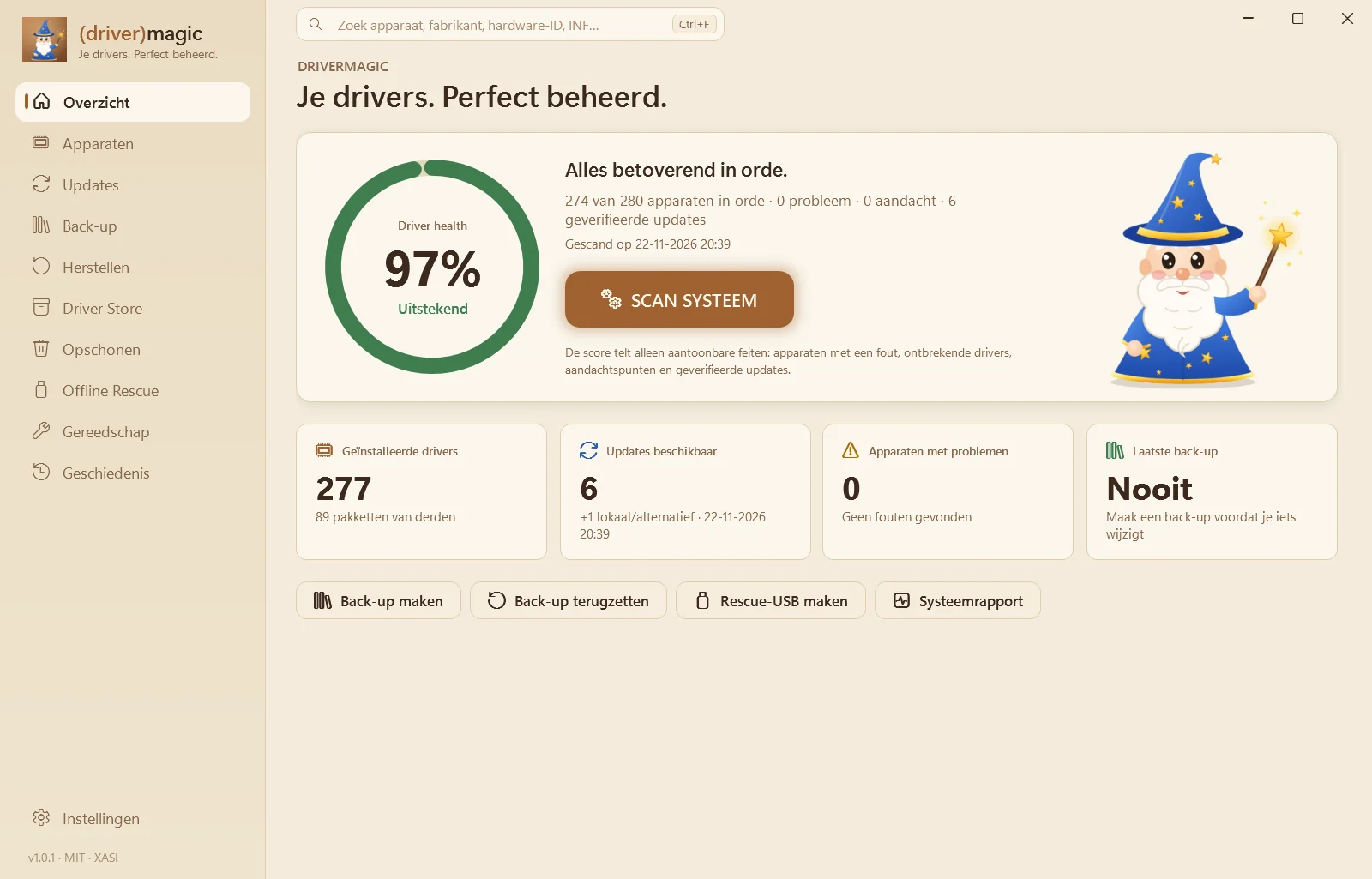
Niets gebeurt zonder jou.Nothing happens without you.
De app draait als gewone gebruiker. Alleen voor echte wijzigingen vraagt Windows één keer om toestemming; een aparte helper accepteert dan uitsluitend gecontroleerde opdrachten.The app runs as a normal user. Only for real changes does Windows ask for permission once; a separate helper then accepts validated commands only.
Wat het wel en niet doet.What it does and doesn't do.
WelDoes
- Een gezondheidsscore die alleen telt wat aantoonbaar is — geen nepalarm.A health score that only counts provable facts — no fake alarms.
- Alleen ondertekende x64-pakketten aanbieden; cataloguspakketten worden vooraf gedownload en gecontroleerd.Only offer signed x64 packages; catalog packages are downloaded and checked first.
- Geplande back-ups via Windows Taakplanner, zonder achtergrondservice.Scheduled backups via Windows Task Scheduler, without a background service.
- Diagnose per Windows-foutcode met begrijpelijke uitleg.Diagnostics per Windows error code with understandable advice.
- Snapshots vergelijken en HTML/CSV/JSON-rapporten maken.Compare snapshots and create HTML/CSV/JSON reports.
NietDoesn't
- Drivers van onbekende downloadsites halen of .exe-installers starten.Fetch drivers from unknown download sites or run .exe installers.
- Fabrikantwebsites afstruinen — wel Microsofts eigen Update Catalog; eigen downloads voeg je toe als bibliotheek.Crawl vendor websites — it does use Microsoft's own Update Catalog; add your own downloads as a repository.
- Iets op de achtergrond installeren of verwijderen.Install or remove anything in the background.
- Secure Boot of handtekeningcontrole uitschakelen.Disable Secure Boot or signature enforcement.
- Fabrikantsoftware, firmware of instellingen back-uppen: alleen de driverpakketten zelf.Back up manufacturer apps, firmware or settings: only the driver packages themselves.

Een beetje magie voor je pc.A little magic for your PC.
ZIP SHA-256 93d05d7453f981c6d20b9639b9d53663ff07ada005f15011f2bcc8462a3a9ffc