×
Windows 11 · meerdere monitorenWindows 11 · multi-monitor

Je bureaublad. Precies zoals jij het achterliet.Your desktop. Exactly as you left it.

Windows 11 schuift je bureaubladpictogrammen door elkaar na een herstart, slaapstand of een monitor die even uitvalt. (icon)lock onthoudt per scherm waar alles hoort en zet het automatisch terug. Rustig vanuit het systeemvak. Windows 11 shuffles your desktop icons after a restart, sleep or a monitor that drops out for a moment. (icon)lock remembers where everything belongs on every screen and puts it back automatically. Quietly, from the notification area.

v1.0.1 · MSI · 41 MB · gratis · NL/EN te kiezen bij installatiefree · choose NL/EN during setup
1440×2560
3440×1440
1440×2560
LOCKED

Waarom (icon)lockWhy (icon)lock

Eén keer rangschikken. Voorgoed rust.Arrange once. Calm for good.

Gebouwd voor opstellingen met meerdere schermen, staande monitoren en verschillende schaalinstellingen. Getest op een ultrawide van 3440×1440 met twee staande 27-inchschermen.Built for multi-monitor setups, portrait screens and mixed scaling. Tested on a 3440×1440 ultrawide flanked by two portrait 27-inch screens.

01

Per monitor, met vaste IDPer monitor, by fixed ID

Posities worden opgeslagen ten opzichte van elk scherm en gekoppeld aan de vaste Windows-ID. Andere schermnummers, een nieuw hoofdscherm of negatieve coördinaten maken niets uit.Positions are stored relative to each screen and tied to its fixed Windows ID. New display numbers, a different primary screen or negative coordinates don't matter.

02

Na een herstart terugBack after a restart

Start met Windows, wacht tot Verkenner en de monitoren stabiel zijn en zet dan de indeling terug. Ook na slaapstand of als een scherm weer verschijnt.Starts with Windows, waits until Explorer and the monitors are stable, then restores the layout. Also after sleep or when a screen comes back.

03

Herkent jouw eigen sleepwerkRecognises your own drags

Sleep je zelf een pictogram, dan wordt dat de nieuwe plek. Verschuift Windows het, dan gaat het binnen 1, 2, 5 of 10 s terug. Nooit tijdens het slepen.Drag an icon yourself and that becomes its new place. If Windows moves it, it goes back within 1, 2, 5 or 10 s. Never mid-drag.

04

Nooit destructiefNever destructive

Bij een onbekende monitorconfiguratie wordt niets automatisch verplaatst. Elke configuratie heeft een eigen indeling; pictogrammen landen nooit buiten beeld.With an unknown monitor configuration nothing moves automatically. Every configuration has its own layout; icons never land off screen.

05

Profielen & back-upsProfiles & backups

Meerdere profielen, automatische back-ups bij elke wijziging en een beschermde ‘laatst werkende’ indeling. Alles lokaal als JSON.Multiple profiles, automatic backups on every change and a protected ‘last working’ layout. Everything local, as JSON.

06

Licht & offlineLight & offline

Gemeten: ± 18 MB eigen geheugen en 0,4% van één CPU-kern terwijl hij bewaakt. Geen internet, geen account, geen telemetrie.Measured: about 18 MB private memory and 0.4% of one CPU core while watching. No internet, no account, no telemetry.

Echte schermenReal screens

Eén klik in het systeemvak. Alles onder controle.One click in the tray. Everything in hand.

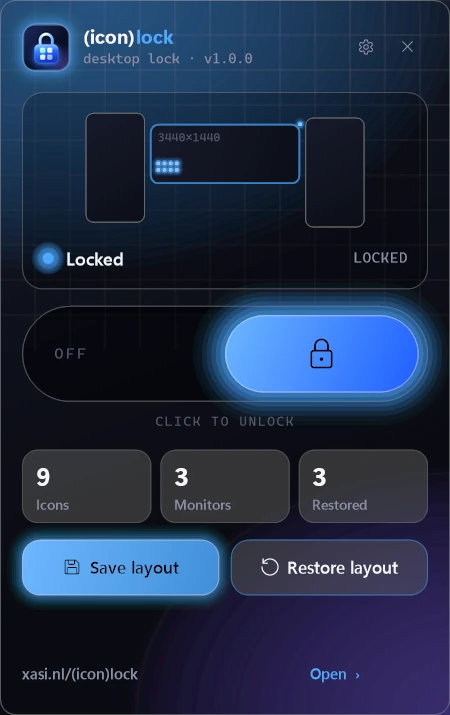
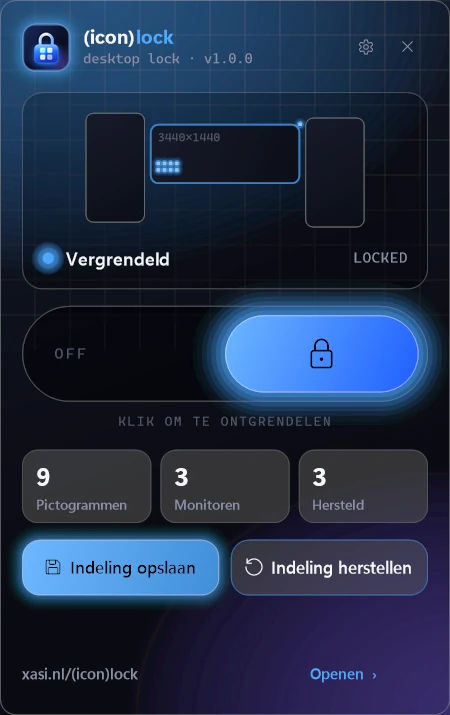
(icon)lock systeemvakpaneel (icon)lock tray panel
SYSTEEMVAKPANEEL · ÉÉN KLIKTRAY PANEL · ONE CLICK
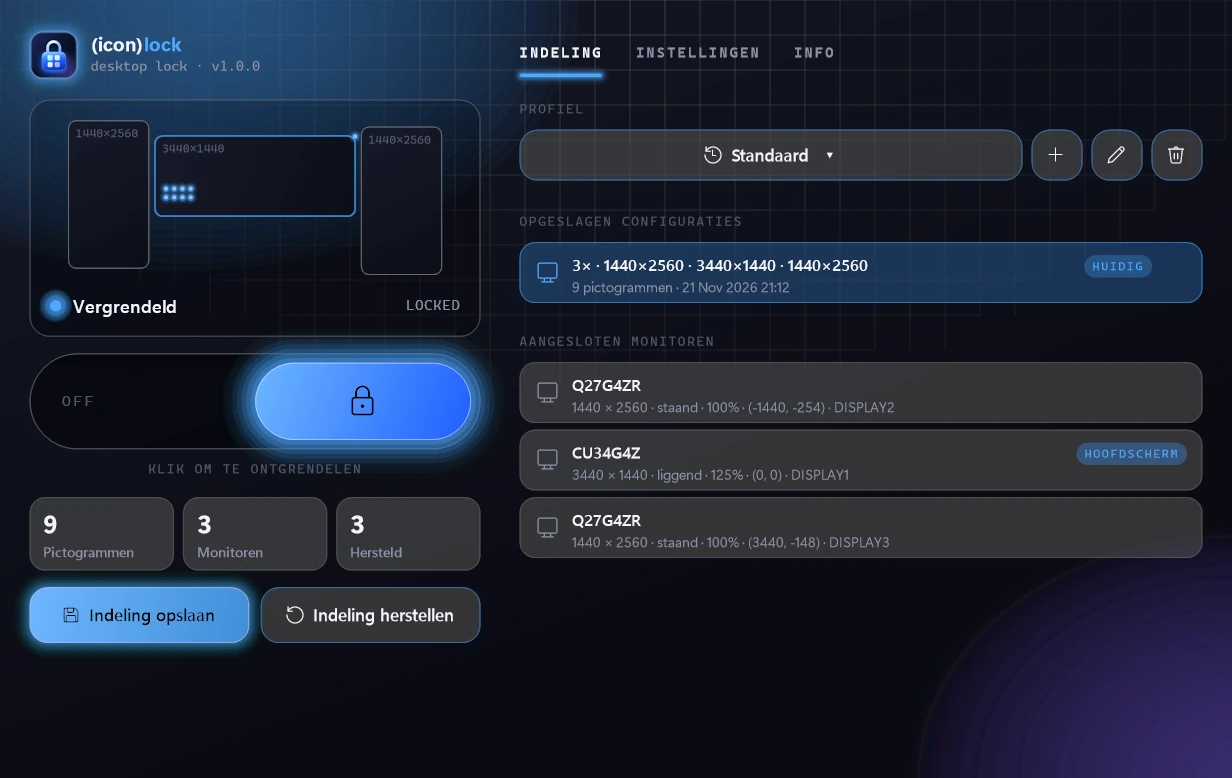
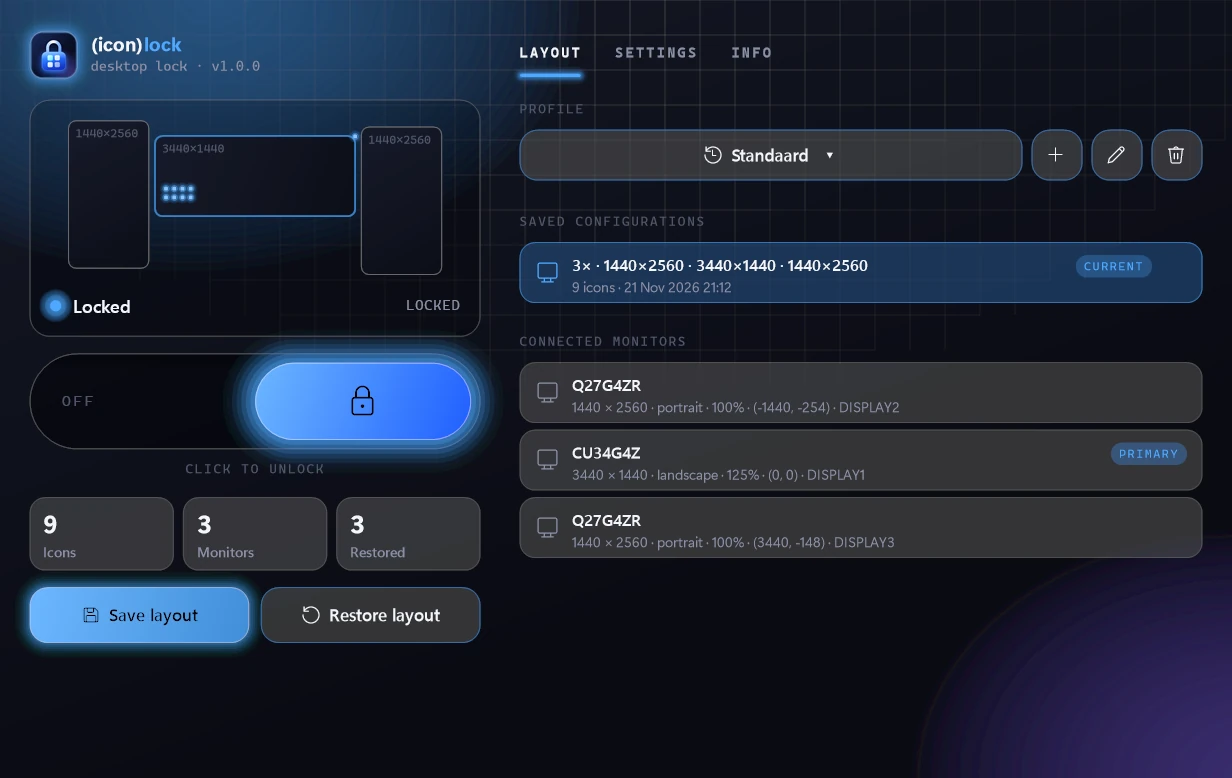
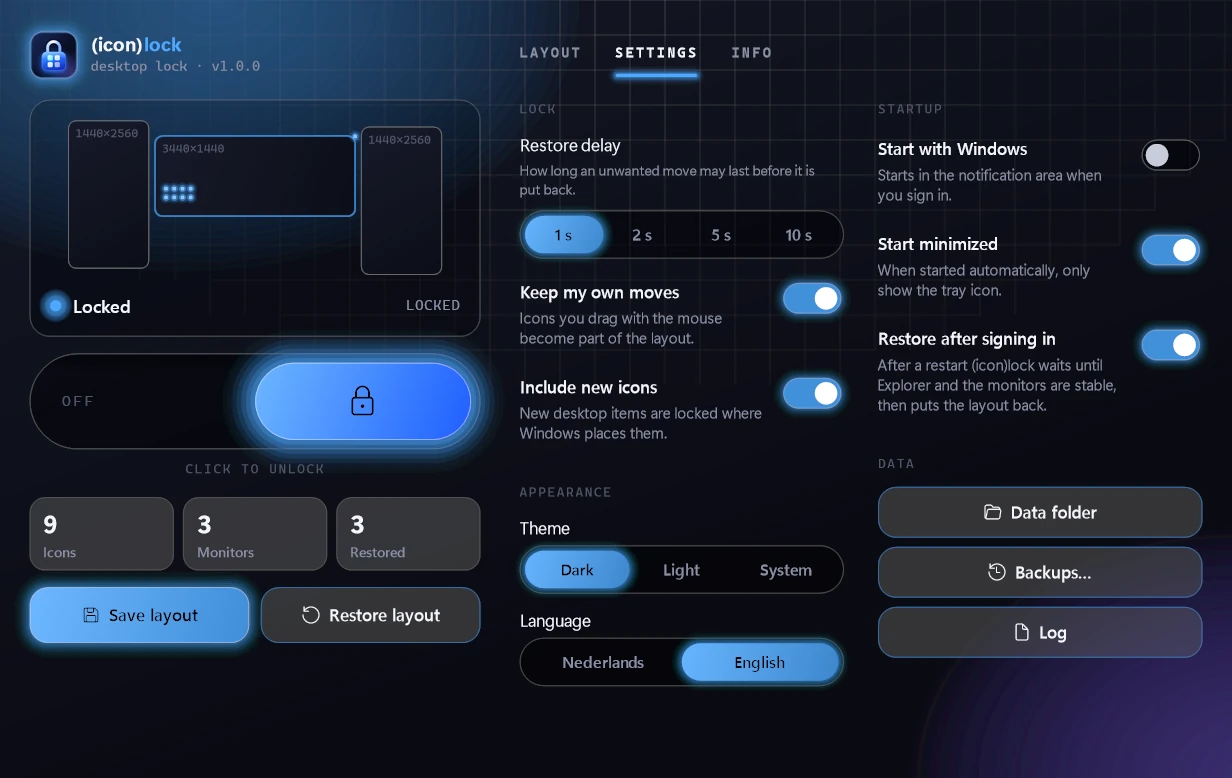
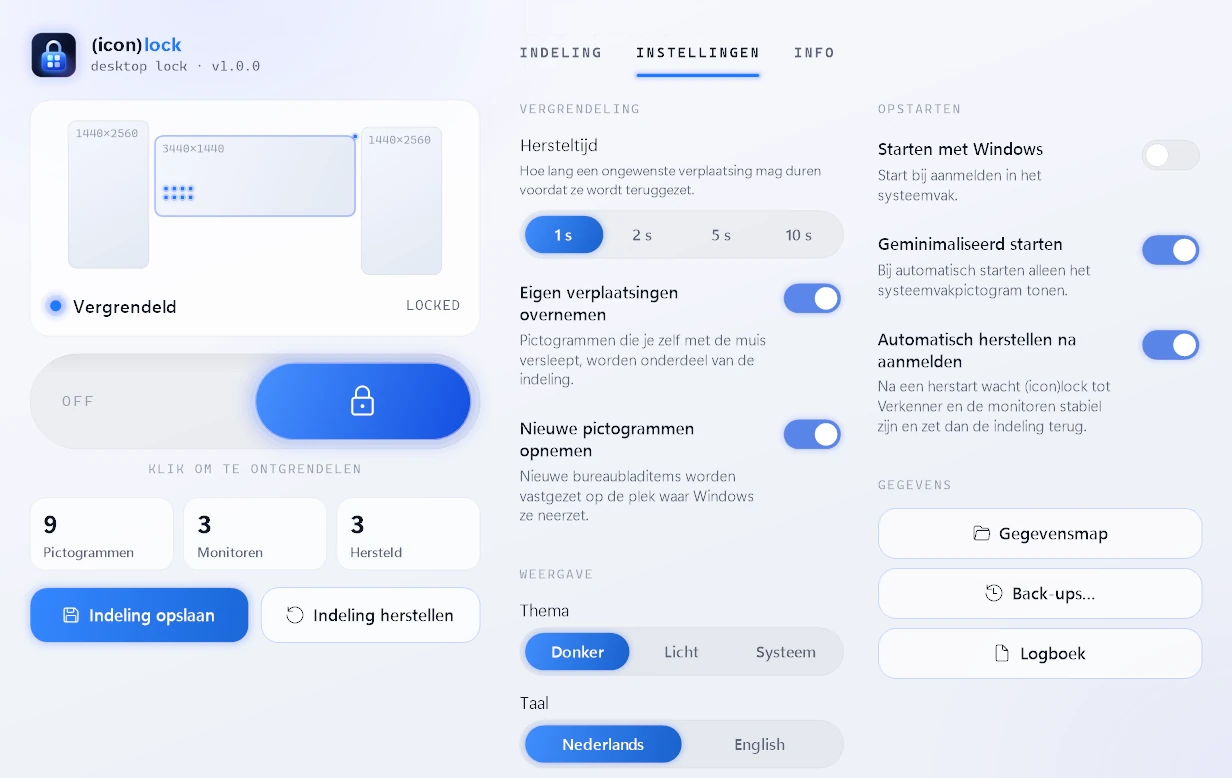
Hoofdvenster met indeling en monitoren Main window with layout and monitors
INDELING · PROFIELEN · MONITORENLAYOUT · PROFILES · MONITORS
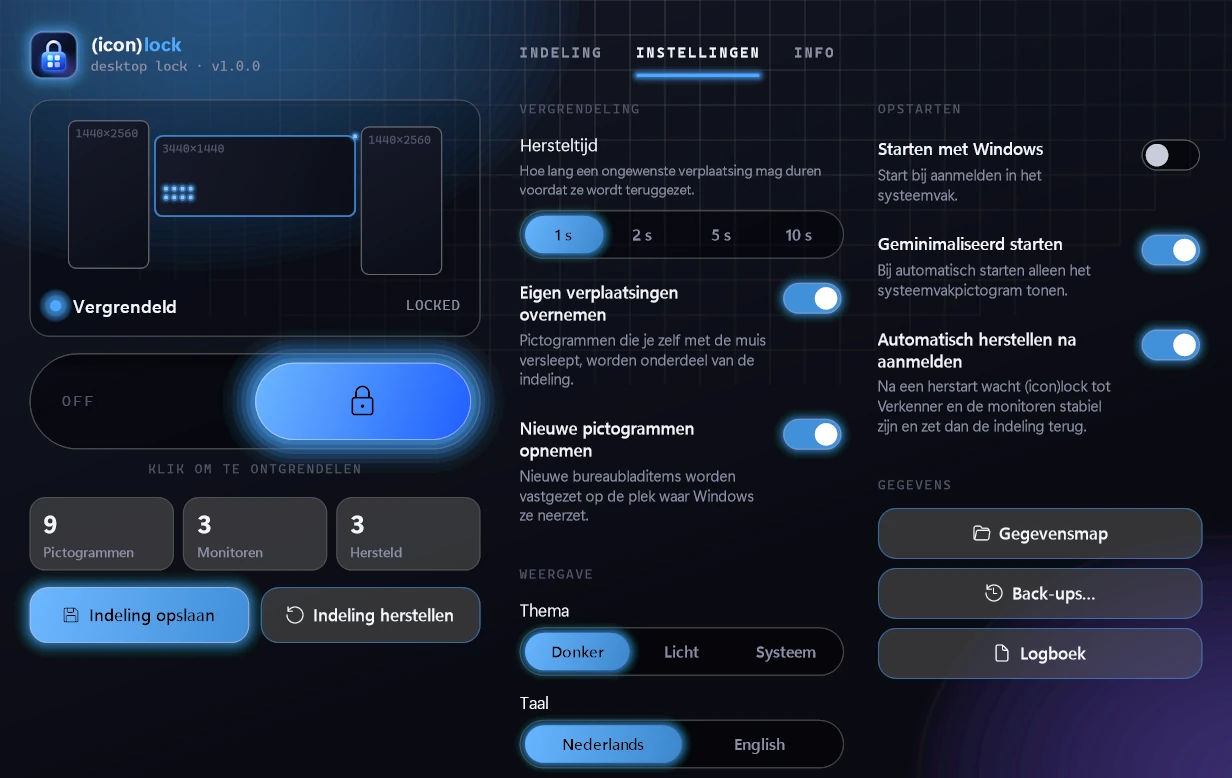
Instellingen Settings
INSTELLINGENSETTINGS
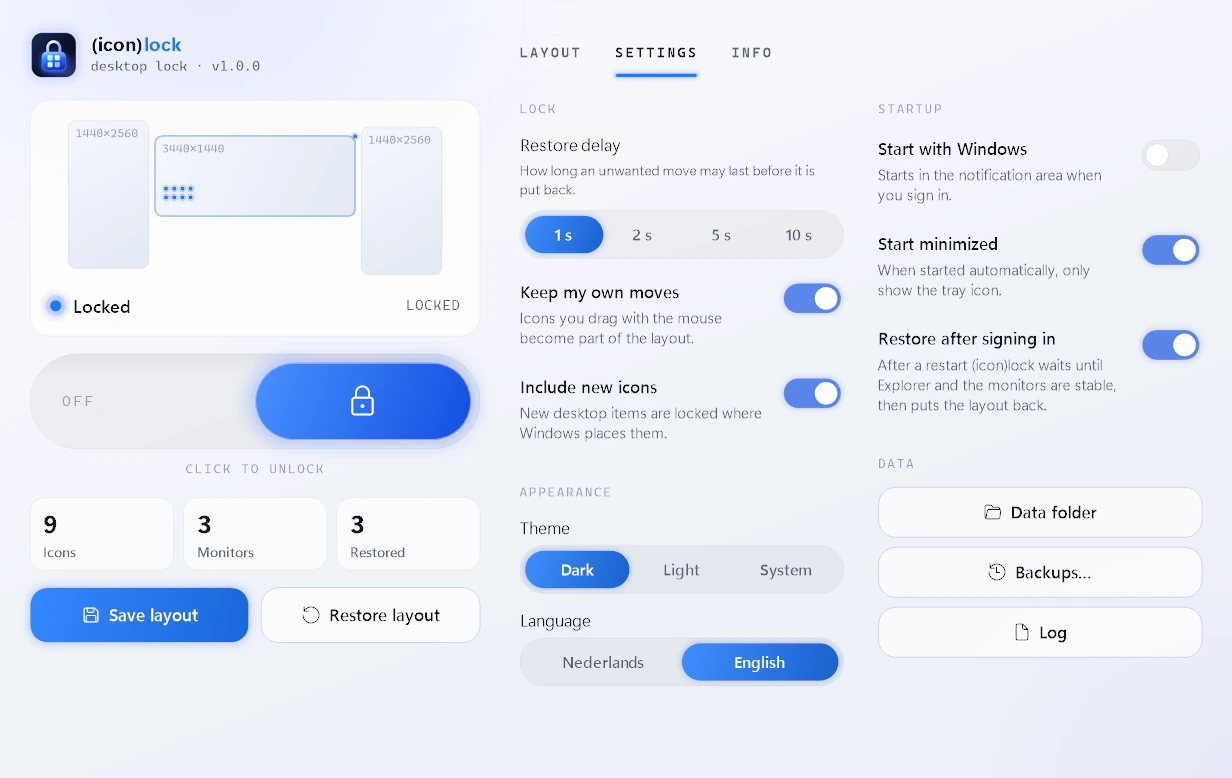
Licht thema Light theme
LICHT THEMALIGHT THEME
In drie stappenThree steps

Rangschik. Bewaar. Vergrendel.Arrange. Save. Lock.

01

RangschikArrange

Zet je pictogrammen over al je schermen waar jij ze wilt hebben.Place your icons across all your screens exactly where you want them.

02

Indeling opslaanSave layout

Eén klik in het paneel. Bij de eerste start gebeurt dat automatisch.One click in the panel. On first start this happens automatically.

03

Laat het losLet go

Desktop Lock staat aan. Verschuift Windows iets, dan staat het binnen seconden terug.Desktop Lock is on. If Windows moves something, it's back within seconds.

Eerlijk is eerlijkStraight talk

Wat het doet. En wat niet.What it does. And what not.

Onder de motorkapUnder the hood

  • Gedocumenteerde shell-interfaces van Windows (IShellWindows › IFolderView), geen code-injectie in Verkenner.
  • Geen beheerdersrechten nodig voor de app zelf.
  • Verkenner meldt verplaatsingen niet; (icon)lock reageert op scherm-, slaap- en aanmeldgebeurtenissen en controleert elke 2 s (± 1,5 ms werk).
  • Loopt Verkenner vast of herstart hij, dan wacht de app en pakt daarna de draad weer op.
  • Documented Windows shell interfaces (IShellWindows › IFolderView), no code injection into Explorer.
  • No administrator rights needed for the app itself.
  • Explorer doesn't announce moves; (icon)lock reacts to display, sleep and sign-in events and checks every 2 s (about 1.5 ms of work).
  • If Explorer hangs or restarts, the app waits and then picks up again.

GrenzenLimits

  • Windows kent geen echte pictogramvergrendeling: (icon)lock zet afwijkingen terug, het voorkomt ze niet.
  • Met ‘Automatisch schikken’ aan kan Windows niet worden overruled.
  • Een nieuwe monitorconfiguratie (andere resolutie, oriëntatie of schaal) vraagt één keer opslaan.
  • Bewust alles herschikken? Zet de vergrendeling even uit en sla daarna op.
  • Windows has no real icon lock: (icon)lock puts changes back, it doesn't prevent them.
  • With ‘Auto arrange’ on, Windows cannot be overruled.
  • A new monitor configuration (different resolution, orientation or scale) needs one save.
  • Rearranging everything on purpose? Turn the lock off for a moment and save afterwards.
(icon)lock

Klaar met opnieuw rangschikken.Done with arranging again.

Windows 11 x64 Installer NL/EN · taal geldt ook in de appInstaller NL/EN · language carries into the app Start met Windows (optioneel)Start with Windows (optional) Bureaubladsnelkoppeling (optioneel)Desktop shortcut (optional) Gegevens blijven bewaard bij verwijderenYour data is kept on uninstall .NET 10 · ingebouwd, niets extra nodigbuilt in, nothing extra needed
SHA-256 6eda360523b286319acfd3ebb91edcce5c54dc63f45206aa1e66a7612a047b3b